Desktop Tooling
ClipTrim
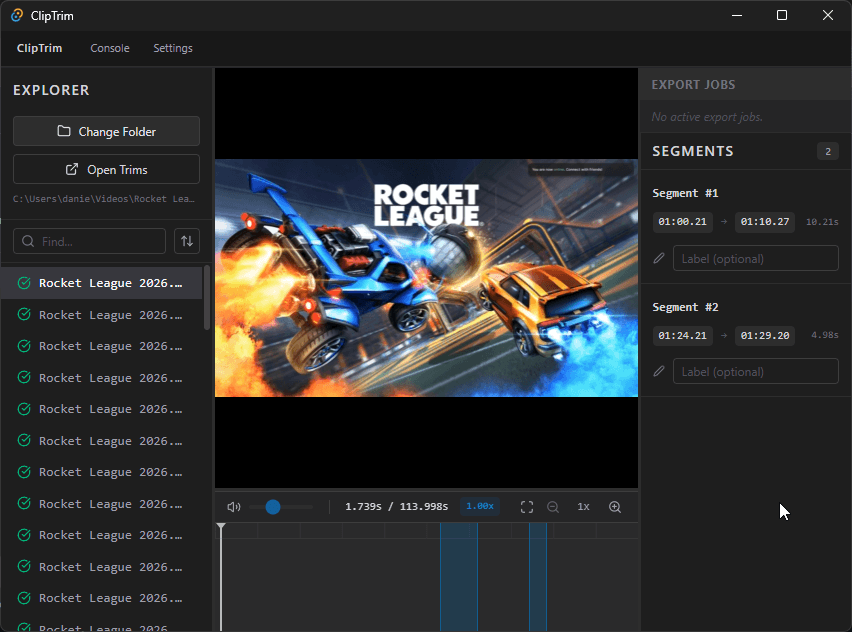
A Tauri desktop utility for scanning video folders, backing up clips, marking trim segments, extracting previews, and exporting with bundled FFmpeg sidecars.
Employer signal
What This Project Shows
This project is stronger than a basic trim UI because it combines a React frontend, Rust commands, SQLite state, filesystem workflow, sidecar binaries, and background export progress.
Problem
What Needed To Be Solved
Full video editors are overpowered for repeated clip-cleanup jobs. The useful workflow is scan a folder, open a clip, mark segments, export named cuts, and keep enough state to continue later.
Approach
How I Built The Solution
I used Tauri to split concerns: React handles the timeline and interface, Rust commands own filesystem/SQLite/FFmpeg work, and the app emits job progress back to the UI during export.
Outcome
What It Demonstrates
ClipTrim demonstrates cross-platform desktop tooling instincts: isolate native work, persist workflow state, and keep a focused media task fast.
Evidence From Source
Source signal
The inspected local repo contains `commands.rs`, `db.rs`, `file_manager.rs`, `ffmpeg.rs`, React components for timeline/sidebar/jobs, and FFmpeg sidecar binaries.
Architecture signal
The app uses explicit Tauri commands for scanning, opening, segment updates, video info, frame extraction, export, and FFmpeg testing.